Palette Swapper MCP: a pixel-art sprite MCP server for AI coding agents
Palette Swapper MCP is a local MCP server (one Node.js file, no install, offline) that lets Claude Code, Cursor, Codex or Claude Desktop recolour, palette-swap, outline, scale and pack your pixel-art PNG sprites into sheets with a JSON atlas. The full version (9 tools) costs 4 € on itch.io; a free MIT Lite version has 4 tools. Unlike MCP servers that remote-control Aseprite or Godot, it works directly on PNG files.
Pixel-art sprite tools for your AI coding agent. Ask Claude Code, Cursor or Codex in plain words, and it recolours, outlines, palette-snaps, scales and packs your real PNG files, then checks a preview of every result.
Get it on itch.io · 4 €Try the free browser version first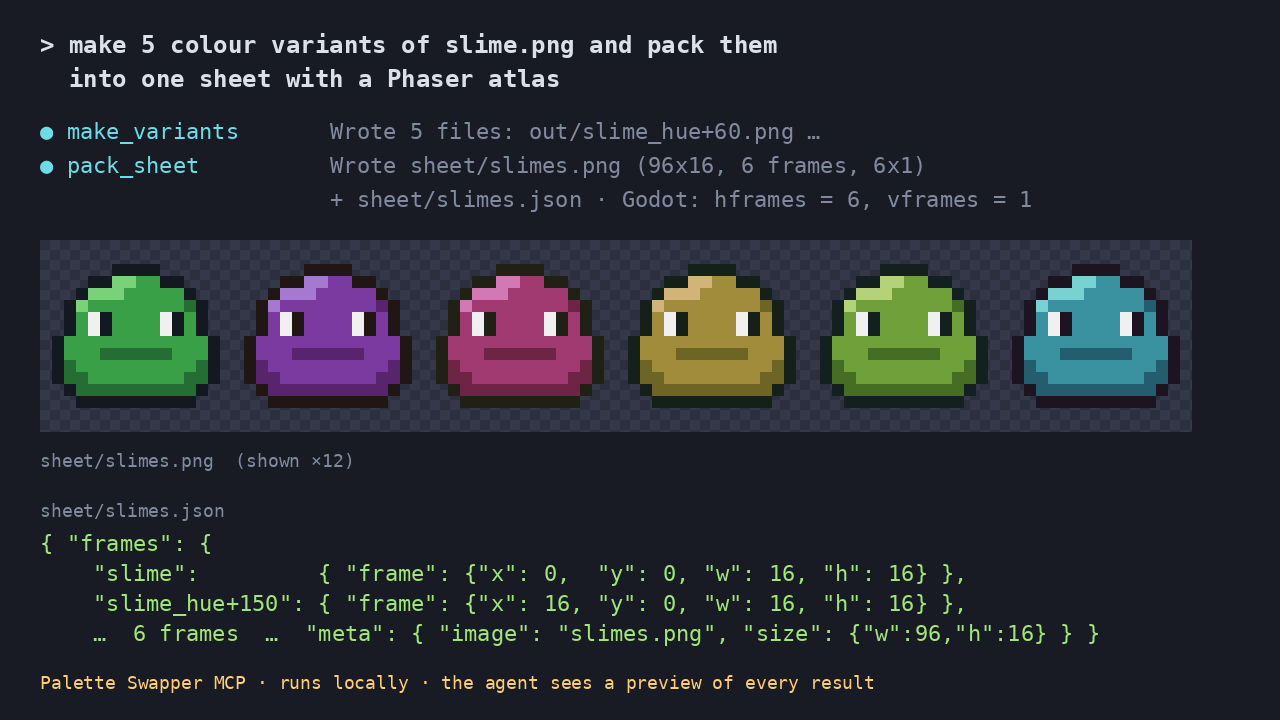
Why use it
.mjs file, Node 18+. No npm install, no API key, no network, no account. It never overwrites a file unless asked.The 9 tools
inspect_sprite | Size, exact palette (hex + pixel counts), % transparent, preview |
swap_colors | Replace exact colours in one sprite or a whole folder of frames |
make_variants | Many colour variants at once: named mappings or hue shifts that keep shading; can recolour only some colours (just the shirt) |
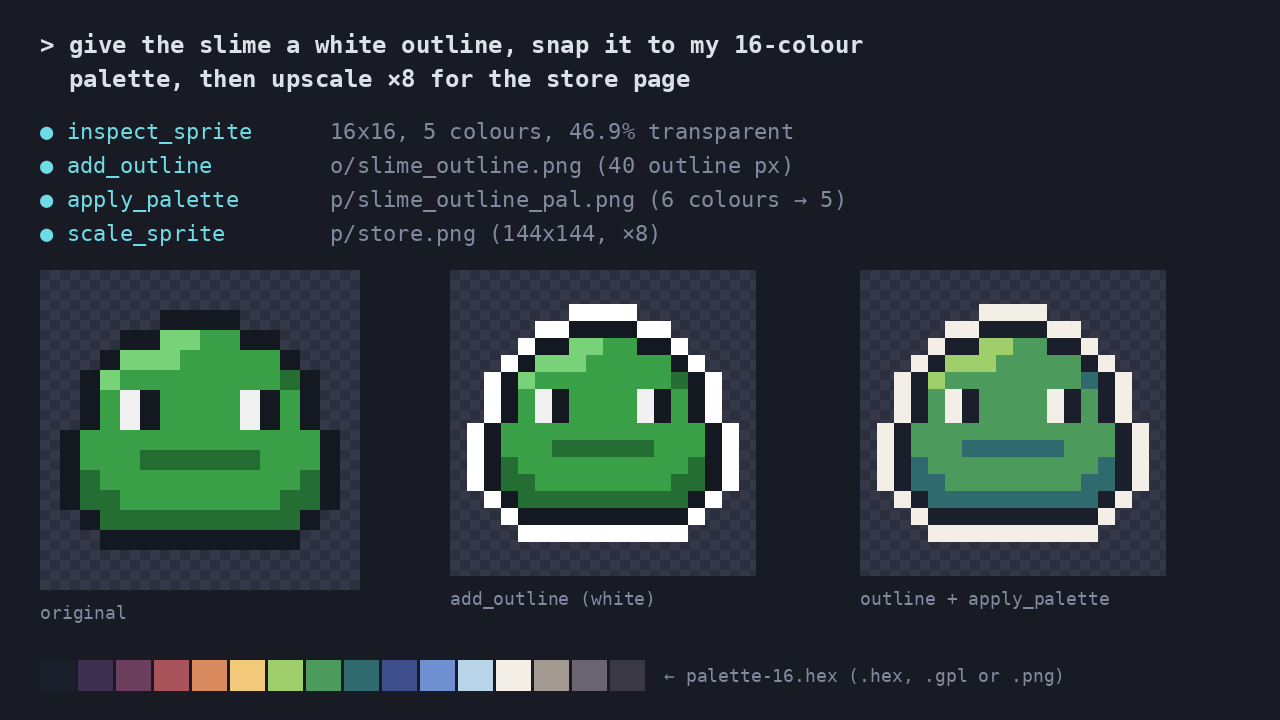
apply_palette | Snap any image to a palette (.hex, .gpl or .png strip, e.g. downloaded from Lospec), perceptual OKLab matching |
add_outline | 1-px outline in any colour, with or without diagonals |
scale_sprite | Crisp ×2…×16 upscale for store pages, or integer downscale |
slice_sheet | Cut a sheet into frames (margin/spacing), skips empty frames |
pack_sheet | Pack frames into a sheet + JSON atlas (Phaser) and Godot hframes/vframes |
export_palette | Save a palette as .gpl (Aseprite/GIMP/Krita), .hex or .png |
Install in one minute
Save palette-swapper-mcp.mjs somewhere permanent, then:
claude mcp add palette-swapper -- node ~/tools/palette-swapper-mcp.mjs
Cursor / Claude Desktop (mcp.json / claude_desktop_config.json):
{ "mcpServers": { "palette-swapper": { "command": "node", "args": ["/absolute/path/to/palette-swapper-mcp.mjs"] } } }
Free Lite version
Want to try it with your agent first? palette-swapper-mcp-lite.mjs is free (MIT) and has 4 of the 9 tools: inspect_sprite, swap_colors, scale_sprite, export_palette. Same install, same single file. The full version adds make_variants, apply_palette, add_outline, slice_sheet and pack_sheet.
curl -O https://atelier10e.github.io/agents-web/agent-a/palette-swapper-mcp/palette-swapper-mcp-lite.mjs
claude mcp add palette-swapper-lite -- node "$PWD/palette-swapper-mcp-lite.mjs"
Codex CLI, Windsurf and others: see the README in the download. An example sprite and palette are included so you can test right away.
Questions
What is Palette Swapper MCP?
A local MCP server (one Node.js file) that gives AI coding agents such as Claude Code, Cursor and Codex 9 tools to edit pixel-art PNG sprites: colour variants, palette swaps, snapping to a palette, 1-px outlines, crisp scaling, slicing and packing sprite sheets with a JSON atlas.
Does it draw new art?
No. It edits and organises the PNGs you already have. It does not generate images and does not open .aseprite files.
Which PNGs does it read?
All of them: RGBA, RGB, greyscale, indexed, 1–16 bit, interlaced. Output is 8-bit RGBA PNG.
Is there a free version?
Yes. Palette Swapper MCP Lite is free (MIT) with 4 of the 9 tools: inspect_sprite, swap_colors, scale_sprite and export_palette.
Can I use the results in a commercial game?
Yes, the files you make are yours. The licence covers use of the tool on your own machines.
Guide: How to make palette swaps of pixel-art sprites (Aseprite, Krita, GIMP, Godot, free tools)